June 20, 2014

Snaps

Finally got around to doing some photo editing today. Some of these have been on the camera for a month or more. A couple I took today and one of my favorites snaps of Jessi is from last year.


Brent's Dad was here today and I took this shot while we were relaxing out back. This is the same Hibiscus that I had last year and we wintered over in the garage. When we brought it out for the summer it didn't have a leaf on it but it's now covered with blooms. Wonder if I can keep it until next year.


A snap of the pink Impatiens that I have in the middle of my table out back. I think they are so pretty.
Love the shade of pink but I don't like the mess they make on my table. Have to wash it off every time I go out to enjoy a cup of coffee.


I have been trying to get some good shots of the Grands that I can have printed and framed but it's hard to find time anymore. They are so busy with school, track, football, band, flag practice, (learning to drive) and just life in general that's hard to find a few minutes to spare there Grammy and her camera.


This was taken of Jess last summer at the beach and it's my favorite of her.


I got this one of Jason a couple of weeks ago when they came for a visit.


This one was snapped in May on our trip to Canaan Valley. Is it just me or does he look a little like Jimmy Dean......or maybe it's just that cool look he has going.


This is the way he normally looks. Phone in hand and smile on face.


A snap of a Brook Trout that Neal caught in Canaan .....yes my son bites his nails but the trout is pretty.
Pin It!

June 19, 2014

In Bloom

Am I lucky or what?  This beautiful flower bench was made by my multi-talented daughter-in-law.  We spent last weekend up there for Amanda's dance recital and I got to bring an early Christmas present home with me....Love, Love, Love it!


This is made out of a twin size bed and she even thought to put a mesh bottom in it for drainage.  It's covered on the inside with heavy burlap that will be replaceable as needed.  I can't thank her enough!
I'm thinking she could sell a ton of these!


Pin It!

June 6, 2014

Buttercups

I started to post this the other day and than didn't. Wasn't pleased with the image the wind was blowing just enough and I had my 70-300 lens on and I can't hold it still.......results image not as sharp as I would like. But I liked the colors.
Pin It!

June 5, 2014

Those poor Boxwoods are showing signs of life again!

I finally got around and trimmed these completely back.  As you can see, there is signs of green and each day, they get more and more little leaves on them.  I'm hoping by July to have them covered back in greenery but I'm sure they won't look as lush as they once were for a year or two.  I'm just glad to see the greenery on them...I so hated to see them die out.  They make a spray that you can apply before winter that will protect the leaves from the dry, cold winds.  I just might have to do some investigating and buy some before next winter. 


And just a shot of one of my pretty flower pots.  We had a 60% chance of huge hail and high winds on Tuesday night so I spent about an hour and a half moving all my pots inside the garage and covering the ones I could not move.  Luckily, we only got a bit of wind with some much needed rainfall.  It's cloudy here today and we have chances of rain now through Saturday.  The insurance adjuster was here for the house...ended up with around $29,000.00 in damages.  Not sure when we will get the new roof on...I've signed with a company but have not got a start date as of yet.  


Miss you!
Pin It!

May 8, 2014

The effects of a long, miserable Winter...

You don't really realize the effects a super cold, long winter has on the landscape until Spring arrives and things should be greening up.  This is just two of my dozens of boxwood's.  As you can see, the damage is beyond repair...I'm still holding out pulling them up for a while longer to see if anything greens up on them. Do not be fooled by those so called botanists that say you don't have to water established plants...they all need moisture, no matter how well established they are.  I believe if I'd watered my boxwood's before the cold winter set in, they would have survived...maybe not 100% but not to the point of damage that they are now. I've had these for over 20 years and hate to lose them. The Azalea that I babied for 3 seasons to get established took one hard winter to die!  My ornament pear trees look like they have developed a disease too...so they are coming down...I will not fight for their lovely white flowers any longer! I'm sure there is a better alternative for these disease trodden beauties. My Korean Lilac is blooming but the beautiful, full bush I had last year is just a memory cause its sparse in leaves this year.  I'll be cutting it way back after the blooms are gone to try and shape it back up into the beautiful lush bush it was last year.  Most of my Hosta survived but not all....the Shasta Daisy that I fought for years to get established is struggling to even get itself started and it should be 6 inches tall by now.  No matter how much you want it, fighting with Mother Nature is a never ending chore.  I'm getting too old to continue this fight and think I'll throw in the towel and admit defeat...the lawn won this battle!  Next week, I'll be feeling more optimistic and give it another fight! LOL and pray that Mother Nature is kind to me and brings me more rain this summer than it has the past 3 summers.

Wind Burned Boxwood's


Pin It!

May 4, 2014

Apple Cinnamon Muffins


Made these the other day and haven't had time to get it ready to post until this morning. They are just from a mix that I pick up at Aldi's but they are so good. Even better when they are still warm with a hot cup of coffee or tea. Little bits of dried apples and then topped with a cinnamon sugar crumble. Brent's Dad was here and he thought they were great.

Don't you love the tea towel that I used in this shot. Looks like vintage linen but I spotted these at Wal-mart and had to have them to use in what little dab of food photography I do. Or maybe I just like to collect food photography props.......I think the later.
Pin It!

April 21, 2014

Outside my window


I love seeing these quick moving little birds at my feeder but they normally don't stay still long enough for me to get a shot. He must have been extra hungry because he hung around long enough for me to grab my camera and snap a few quick shots. Luckily I had my zoom lens on but didn't have time to put it on my tripod and I have a hard time holding the camera still with this lens on and zoomed full out. Grabbed a chair and used the back of it for support.
Pin It!

April 14, 2014

The Last Sympathy Cards (for now....hopefully, I don't need anymore for a long while)

This is the last sympathy cards I made up...I just changed the colors on this one so I could have two cards but not send exactly alike.  The image is a file I bought from JustInklined. The images from here always print up nice and crisp.  I wanted it to look layered up on several layers so I took it into Studio Design and placed it on the top layer of my card...this way I knew how much to extend it out over all the layers so it would print on three layers of my card.  Once I figured out how big to print the image, it then was just a matter of downsizing each layer but leaving the image the same size.  I embossed the sentiment and the border on the top layer after I printed out the image. I then printed out two more layers with the image and started lining them all up and putting them together with foam tape.  This first one has three layers and I used yellow ribbon with black pearls. 


On this second image, I messed up the middle layer and didn't have time to re-do it.  So...I just added two layers instead of three...on this one I used white pearls and teal ribbon.  I like the colors of this one better but I like the three layers of the first card the most. 


Enjoy!


Pin It!

April 10, 2014

Sharing a few more cards

As you can see, I had a rash of Sympathy cards to make...I'm going to share 4 of them today...the last three are alike except I changed up the color of the blossoms and pearls.  Nothing much to share about these...I used embossing folders and cut the blossoms on the Cameo.  On the first card, the brush was by Katie Pertiet. I cut the butterfly with the Cameo and then added glitter to it.  I printed the sentiment on the velum and then cut the strip for the front of the card.  Layered it on some new cardstock I found by Bazzill called Bling...it has this linen look with a beautiful sheen to it.  I wish I'd picked up a lot more. The only difference between these two cards is the pearls and the color of the bottom layer.


As you can see...all I did was change up the colors and on the last one, I rounded the corners.  I was going after a frame/matted look for the sentiment..I can't emboss but I can fake it...LOL...I think the purple one is my favorite..if you look closely, you can see the beautiful sheen on the purple sentiment frame. And yes, they are all the same white...LOL...I still can't take pictures and get the exposure correct...

That's all for tonight...I've got a couple more Sympathy cards and then Gavin's birthday card...will share those this weekend.

Thanks for looking!

Pin It!

April 9, 2014

Card in a Box

I finally gave this technique a try....the first image is the first one I did and I wasn't real happy with it but the second card was more to my liking.  They were fun to design and I can see myself making more of them.  Might do one for Mother's Day...

On this image I used elements from a kit by Lori Whitlock called Maggie.  The paper is from Birthday Celebration...a collaboration by several different artists.  The box cut file was purchased from the Silhouette store.  The rhinestones were from a roll that Jerri Ann bought me for Christmas...first time I've used them...I'm a hoarder...can't get myself to use the really pretty stuff...LOL  Everything was traced and cut in the Cameo and then I added liquid pearls and glitter to the flowers. 

I liked this one much, much better...just more up my alley in colors and design.  Everything is from a kit called Little Charmer by Laurie Ann HGD. 

My last share today is a birthday card I made up for a friend of mine who turned 60...she is kind of a tom boy so I knew I couldn't do frilly and this is the best I could do...love the colors!


The red dotted paper is from a kit called Retro Red by Robin Sampson and the blue chevon paper is from a paper pack called Breezy Summer by My Clipart store. I added white pen stitching and ran my stars through my Xyron to add adhesive and then glittered them up.  The kraft card base is from PaperTrey Ink.  The sentiment is by Kolette Hall...I just changed the color and did a print and cut onto the oval shape. I cut the tag shape from kraft cardstock and then made a bit smaller size of the tag, cut it four times and layered it on top of each other with adhesive...then used it to emboss my larger tag shape.  That is one thing I wish the Cameo could do..emboss around a cut shape but it doesn't. 

That's all for now...if I don't get busy with a birthday card, it will be too late and my grandson will be cardless...LOL....this is the first year that I do not have to make any party stuff...he's finally outgrown the parties and is just having a few over night guest.  I kind of miss it! 

Thanks for looking!


Pin It!

April 4, 2014

Bunny Banner


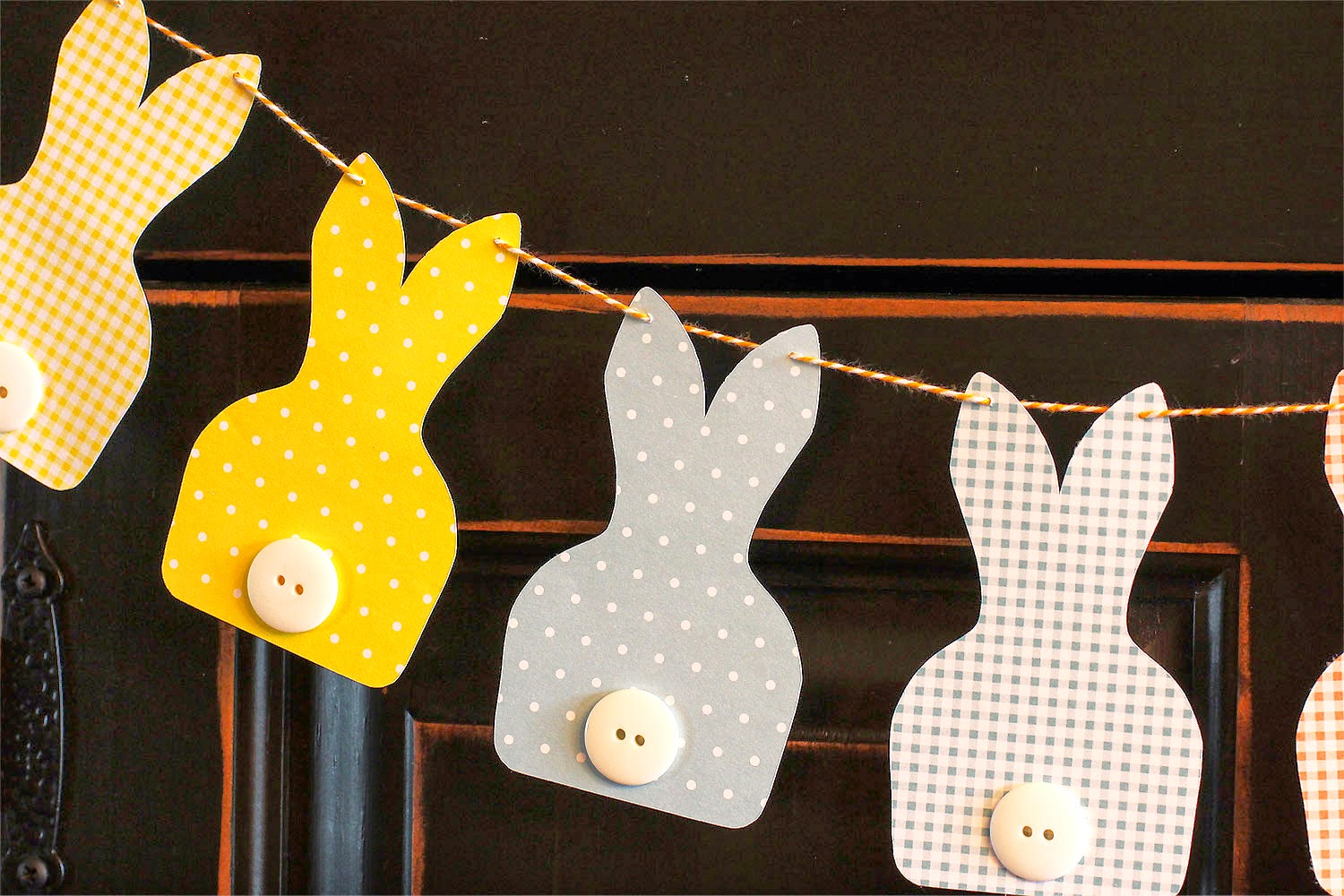
Saw a bunny banner some what like this on Pinterest but it was to buy on Etsy. I didn't want to pay for something this simple to make so I started looking around for a bunny silhouette that I liked that was similar. Found another one but didn't like because the ears were different so I just drew my own in Photoshop. After I finally got the pattern loaded into the Silhouette I cut them from some pastel cardstock that I had on hand. Didn't have any white pom-pom's and didn't want to try making any that small so I got out my collection of white pearl buttons and finally found 8 that was almost alike some shinny and some dull but I think they look great. Stung them together with some orange twine.
I haven't crafted anything for a long time and forgot how much fun it is.


If anyone wants the pattern let me know.
Pin It!

April 3, 2014

Cherry Upside Down Dessert

This is SO good.....I did change up the recipe just a bit....I used Wilderness Sugar Free Cherry Pie filling and it just looked like it was more juice than cherries so I added a can of unsweetened Tart Cherries in water that I drained first.  This just added more cherries to the pie filling and only added 6 calories to the dessert because I cut my 9 x 9 inch dessert into 9 servings instead of the 8 that Joanna cut hers. 

This is the cast of characters....almond extract, sugar-free cherry pie filling, reduced-calorie margarine, Heart Smart Bisquick mix, Splenda granular, fat-free half and half and slivered almonds...yum, yum....


It even made a very pretty dish before I baked it.


but once it came out of the oven and had that golden color, I wanted to dive in and eat it right then...I refrained and saved it for supper...Bill was in heaven, as cherries are his favorite fruit!


I will be remembering this dessert when I have to take something to a fish fry or BBQ....


Cherry Upside-Down Dessert
Serves 9

1 1/2 tsp. almond extract *
1 (20-ounce) can sugar-free cherry pie filling (I used Wilderness)
1 (20-ounce) can Tart Cherries in water, drained
1/4 cup reduced-calorie margarine * (I used Smart Balance)
1 1/2 cups reduced-fat biscuit baking mix (I used Heart Smart Bisquick)
3/4 cup Splenda Granular (if you use Splenda Blend, I think you could cut it down to 1/2 cup)
2/3 cup fat-free half & half
1/4 cup slivered almonds

Preheat oven to 350°. Spray a 9 x 9 inch baking dish with butter-flavored cooking spray.  In medium bowl combine cherry pie filling, drained tart cherries and 1/2 tsp. almond extract.  Evenly spoon into prepared baking dish.  Drop 4 tsp. margarine by 1/2 teaspoonful evenly over cherry-pie-filling mixture. In a large bowl, combine baking mix and Splenda. Add half & half, remaining 2 Tbs + 2 tsp. margarine and remaining 1 tsp. almond extract. Mix gently to combine. Spoon batter evenly over top. Sprinkle almonds evenly over all. Bake for 18 to 22 minutes. Plan pan on a wire rack and let set for at least 10 minutes. Divide into 9 servings.

189 calories, 7g fat, 3g Protein, 27g Carbohydrates, 366 mg Sodium, 53mg Calcium, 2g Fiber


Pin It!

April 2, 2014

March makes way for April

I had all intentions of posting this image around St. Pat's day but life got in the way, as usual!  So...even through it is the 2nd of April, I'm posting it anyway.  I loved this rock pot and there was a sign in the plant that said "Leprechaun Toes" ...its really baby tears but the idea was cute....and the sun shining on it all just called to be photographed. 


Pin It!

March 12, 2014

Only in Missouri

It was 68 degrees yesterday afternoon...73 the day before and last night we had high winds, rain, sheet and then snow....that is one thing this state is completely certain of...if you don't like our weather, just hang around a bit, it WILL change!  LOL....

So, I was sorting through some pictures and came across this one....figure I had it ready for the blog, but never posted it...if I did, I guess we will just have to re-visit it...LOL...


Enjoy!


Pin It!

March 11, 2014

The Last of the Cards...now to get creating again!

This is it...the last of the cards I've made to date....I do have a project in the works but it will be a day or two before its completed...

The first two cards used the same papers, just a bit of changing up of the layering.  I'm not sure which I like better...the first or the second one.  I made the first one for my mom and was never completely satisfied with how it was turning out so when I made the second one for Rox, I changed up the papers a bit and really think I like it the best.  Not real, real happy with either of them.  It's funny how sometimes I absolutely love how a card turns out and other times I just can't put my finger on what I don't like and what needs to be changed.

Anyway, I used paper from Sweet Shoppe Designs called Free Spirit. The newsprint paper was in my patterns folder but not sure who the designer was. I download lots of free papers and those get separated from their designers pretty often.  I had purchased these charms by Tim Holtz a while back and the hummingbird was just perfect for this card...Mom loves her hummingbirds!  The flower cluster in the circle is by Katie Pertiet and the birdcage is from the Silhouette Store.  The tiny butterflies came in a kit and luckily, were the perfect size!  I made my card-base out of Rustic Creme from Papertrey Ink and then made the layers to add to the top by resizing the circle cut out on each layer...I wanted a matted picture frame look.  This was harder than you would think...LOL...or for me it was.  The flower cluster and the birdcage (with drop shadow) were printed onto the pink layer of paper, which meant I had to keep it white around the flower cluster and still keep it lined up with each additional circle layer.  As you can see, it worked but it took a few cuts to get it there.  The sentiment tag is one I made for Maxine's birthday tag assortment.  The font is Great Vibes.  A few pink pearls to the bottom and a bit of distress ink to the edges and a pink satin bow. 


On this one I changed the sentiment to be used as a get well or thinking of you type card.  I left the scallop circle off completely but I added cut out circles to the border stripe. This was easily done in SDE by opening the border strip, adding a circle under the first scallop and then doing a copy/paste until I had enough circles for every scallop...then I positioned the first circle directly under the left side scallop and positioned the right circle directly under the right side scallop.  Opened up the alignment tool and selected space horizontally...this put the circles directly under each of the scallops.  I then selected all the circles and did a duplicate below and lined that second set up above the bottom scallops. Selected all the circles and the border strip, right clicked and made compound path...perfect!


Again, I used the same papers from the Free Spirit kit but used a cream layer on the bottom, the green in the middle and the rose pattern on top.  I cut the border strip out of green (used the eye dropper tool to select a green out of the green pattern layer) and then filled the top border layer with a pink stripe out of the kit.  I sewed this on with cream colored thread.  I did not distress any on this card...I wanted to sew the white on the sentiment tag but didn't figure I could follow the design so just added some white fake stitching.  The butterflies were cut out of some glitter cardstock and doubled up with foam dots and added to the birdcage.  The bow is seam binding with a pearl glued to the center and I added a few small pearls around on the floral background.  The Rainbow font is Mardian Demo and the rest is just plain Arial.  

And the last one is from a card I shared before...the bedspread inspiration...I had the background left over.  It didn't emboss as well as I would have liked so I ended up printing out another one and re-embossing but I hated to throw this away.  So...I decided to use it for a thank you card.  I had watched this video on stamping a butterfly onto pattern paper and then cutting it out and I liked the look...just don't have any stamps to do it with...LOL...so, I found a butterfly cut file that I liked, gave it a black fill and then did a offset and deleted all the inside stuff. I know this doesn't make sense to you, but when you do an offset to something like this butterfly, it will off set all the 'holes' and around the outside edge.  I only wanted the base of the butterfly, not with all the 'holes', so I erased all the stuff on the inside.  Oh, wow...why can't I say what I did and make sense?  I need to do a pic tutorial so this makes sense.  Anyway, I filled the offset with purple, grouped both the black filled butterfly and the purple offset and told the program to just cut the outer edge.  I did a print and cut and came up with this butterfly....basically a stamped look on purple card stock...I couldn't find any purple pattern paper that I thought looked good behind the 'fake' stamp.  I then just added some glitter glue and let it dry.  Popped it up on the background, added a pretty purple ribbon and a Thank you tag.  I rounded the corners, layered it on black and then on the card base.  I love the black/gray white with the splash of color. Oh, yeah, notice that font?  I really like that Mrs. Blackfort!


That's all for now!  


Pin It!

March 9, 2014

Simple Banana Pudding


Simple Banana Pudding I whipped up for dinner last night.

2 sheets of graham crackers
1 4 oz. box of cook & serve banana pudding
2/3 cup instant nonfat dry milk
2 cups water
Fat Free Cool Whip

Crush graham crackers and divide between 4 dishes. Mix dry milk & water add to pudding mix and cook as directed on box. Pour over graham crackers. Chill .
Add Cool Whip before serving.
Quick and simple but it sure was good.
Pin It!

March 7, 2014

Almost done....

with the last of the cards....except I just finished up three this week and still need to photograph them.  I'll post those another day! 

This first card was done for my son-in-law...I cased this card almost exactly!  Too bad I can't find the image again so I can post a link...but I will come across it some day and update...anyway, she had used stamps to make her card...me, I don't own any so I had to do it on the computer and my software of choice was Silhouette Designer Edition...love this program!  I first set up my card base and the layer to go on top and chose the font, Aharoni. I wanted a nice even font and this one worked perfectly.  I first typed my first line, adjusted the spacing and then just did a copy/paste for the next 4 lines.  I chose a dark gray for the color and selected no cut in the cut window.  All I wanted was to print this.  I set my paper size to 5 x 7 in the software and my printer program and used AC Gray cardstock and sent it to the printer...I love this feature.  I just trimmed it a bit on all four sides once it had printed so it would measure 4.5 x 6.5 (I like to make my card bases to 4.75 x 6.75).  I then went back to my software and added two stars on top of my font and lined then up with the type.  Then I just selected the three rows of fonts that were 'underneath' the star and did a copy/paste on 'top' of the star.  I selected all three of the copied rolls of text and the star and moved them off to the side of my card layer so I could work with them.  I did a rasterize of the text and the ungrouped them. This way I could give each letter a color fill. I deleted any letters that were 'outside' the star and then colored each letter that was 'inside' the star...turned on my registration marks, set my size to 5 x 7 and sent it to the printer.  Once it printed, I loaded it in the Silhouette and cut the stars (BTW...you turn off cut on the colored letters, you only want to print them).  Since I wanted my stars to be 'thicker', I went back and cut 2 more stars for each size and then glued them together to form my 'fake' chipboard element.  I then lined up my stars to match my gray printed font and stuck it down with glue dots.  Finished it all up by layering it on top of my cardbase. 


Now...I just happened to take some images while I was making this next card and decided to include them so you can see how I design the card in the software and then cut them out...sorry, I didn't get a shot as they were coming out of the printer but you understand that part..right?  LOL....just make sure to turn registration marks on so they print along with your cut outs. The first image is my design laid out on my cutting mat in the Silhouette Designer Edition.  As you can see, I try (don't always remember) to keep a layered version of the finished card with my file so that I can remember how I put it all together if I want to make another one. The second image shows the process of cutting the files out once I've printed it off.  I always do an offset to all of my images or just put a rectangle behind them in the same color with no cut set so that when it cuts, there is no white showing around the edges. My Cameo does an awesome job 98% of the time cutting right along the line but this way I never have to worry about the other 2% of the time...LOL....Once I have it cut (I almost always use AC card stock as it cuts like butter in the machine), then I use my Spectrum markers to 'color' the edges...hate seeing that white edge. I've got to get some use out of those expensive markers...LOL..

Everything is done in the program...I fill my shapes and add my sentiment.  I would die if my cutter quit!  I can't imagine cutting with scissors like I used to!  Remember the 100 boxes I made for Jerri Ann's wedding and cut by hand...


My card was made using a kit called Little Charmer by Laurie Ann HGD and some paper from Beachy Keen by Erica Zane...the kite paper (Beachy Keen) matched perfectly with the flowers from Little Charmer.  I just used the eye dropper tool to match my solid images.  I used a cut file called Lattice Screen from the online store. Used the offset tool to add a white sticker border around the flowers and then cut them and layered them on top of the lattice and added buttons and twice.  All of the paper is layered on a kraft card base and rounded one corner.  Used colored pens for my fake stitching and added a few gems. 


Last one....a birthday card for my niece.  I used paper from Birthday Celebration...a collab by quite a few artist...Laurie Ann being one of them...I love her designs!  I used her music sheet to the background and then just drew some funky circles and used the sketch tool in the program to give it the hand drawn pen look and made the line color white...spaced them around the edges of the background.  I then made my cardbase by adding a scallop edge to the right side and welding it to my card front...I printed the inside sentiment and my logo on the back before I sent it to the Cameo to cut the scallop edge.  I'm sure there would have been an easier way to add the color to that edge but this was the only way I could figure it out. I then cut a scallop edge, identical to my scallop edge on my card and filled it with the turquoise color, cut it out and glued it on top of the card base edge.  I then cut the pink strip, added glitter by putting double stick tape down the front and then adhering the glitter to the tape.  Then I layered the backgound to the front of the cardbase and covered my seam between the background and the turquoise border with the pink glittered border. The wordart and tag were both part of the digital kit and I just traced them and cut them with the Cameo as well as the birthday cake. I did cut two of the birthday cakes and layered them with foam dots. The first cake is glued directly to the background, then the tag sentiment is added with foam dots and then the second cake is added on top of that with higher foam dots.  A few pearls, some fake white stitching and some glitter to the cake and popped on the Happy Birthday...super cute!


I hope you've enjoyed today's post! I hope to post the final three next week....need to get some groceries bought and go for my walk.


Pin It!

March 6, 2014

Cards, cards and more Cards!

This first card I made for the little man's best friend...he is also the sweetest kid I think I know. Whenever Gavin comes here, Ethan usually comes a day or two too....he loves to cook, so we usually get one meal out of him...he remembered my birthday, so I had to make him a special card.

The background paper is by Yellow Lemon and the kit is called Number 1...appropriate, don't you think?  LOL

I got the frame, scallop circle, star and banner from the Silhouette Store and just added some digital paper files and cut them out.  On the number 13, I added Glossy Accents and red glitter.  He thought it was way cool and sent me a Thank you text.  


This next one was a birthday card for a longtime friend...The kit is by Erica Zane called BeachyKeen and I've used it before...I love the soft color combination.  The butterflies are a cut file and I just used the Print n Cut feature of SDE.  I added a scallop edge to two different colors of border and then made a butterfly cutout, layered them both together and then cut a double cut of the three butterflies out of different pattern paper and layered them on top of each other and then used pop dots to put them inside the cutout.  Added some pearls along the edge for interest and some colored rhinestones and twine.  
I absolutely love the Print n Cut feature of this program...saves on tons of ink!
The font is SplendidOrnamenty.


Moving on.....this next card was made for a dear, dear friend...one that I've known since our kids were little!  I had got this magazine (can't even remember what it is called) and they had this bedspread layout.  I wish I still had the magazine so I could show you how I came up with this card but I don't.  The bedspread was sewn in columns...does that make sense?  Like you can see in my card...the embossing on the background..and then it had the flowers printed in black/gray with a few colored butterflies sprinkled off and on over the spread..I just loved the look and thought it would make a neat card.  Again, I used SDE with the Print n cut feature....the beautiful frame was a freebie SVG file I got a long, long time ago.....when I got my first Cricut.   I used some flower brushes and music sheets to design my background and then printed it off and ran it through my column embossing folder but it doesn't show up very good in this image.  It's layered on black cardstock and then added to the front of some apricot card stock. Added some twine, pearls to the butterflies and some wording art.  Added an envelope liner to finish it all off.


This is the beginning of the Valentine projects.  These were made for the grands up north...nothing too fancy or too big as postage is getting too high....I just made some boxes I bought from the Silhouette Store, used the print n Cut to fill the shapes and cut them all out.  The paper used was Sweet Valentine by Sassy Designs.  I also used cut files from Miss Kate Kutables.  It takes me forever to get my papers chosen and then figure out how to layer these up...the monster drove me nuts before I figured it out...LOL....added some ribbon, twine and sentiment tags. Sorry the picture isn't the best...I was really running late with these and had to take a picture quick and didn't realize I should have changed my aperture until after they were shipped north. I filled them with treats and money....


And these were made for Gavin, Darby and Tracer...they were hand delivered so I could go a bit larger on projects...LOL...the files are all by the extremely talented Mary from SVG cuts....her cut files are so perfect...unless I just really screw up with my alignment the projects come out perfect.  Darby and Tracer still talk about their boots!  I know Darby is getting too big for this kind of stuff but I make them anyway...figure she can throw them out if she wants too. 
The paper for Darby's boot is Giddy Up by Carta Bella, designed by Samantha Walker.  Tracers boot?  I have no idea....I'm thinking it was paper I had in my stash...or some I'd printed off a long time ago?  The blue is AC Cardstock...I do know that.  If I come across it, I'll update the post.  The guitar was made for Gavin...it was so cute!  I can see me doing this with the grands this summer.  The top of the guitar comes off and its a box...filled with Snickers and a small amount of money.  I just used brown AC cardstock for all of it except for the sound board panel and it was made using some more pattern paper that I can't find at the moment....update when I do.  This is the biggest reason I need to add notes!  I can't remember what I did yesterday, let alone 6 months later!  I also used some glitter cardstock that I had for the ring....just to give it a bit of a Valentine look but not enough that he couldn't display it all year.  I'm sure him and Dad fought over the candy!


This is just another shot of the guitar....I liked this prospective!


Moving on to the last of the Valentine stuff...a very simple card for a friend....some white cardstock, a white swirl cutout and a red heart with a bit of glitter...simple, simple, simple!


I'm going to call it quits for today...I'll post the rest tomorrow!

Enjoy!


Pin It!

March 4, 2014

Very Late 2013 Halloween or Super Early 2014 Halloween!

LOL.....I did make these for the grands this past Halloween but we will just pretend that I'm super organized and already ready for Halloween 2014....LOL...not EVER going to happen.  If I can't procrastinate, I can't wrap my mind around any ideas! Just like my mothers birthday card...I've had it listed on the top of my TO DO list for 2 weeks now...still haven't got it even started and I did so want to get it done in advance...

Anyway, here we go....I'm sure I won't remember where all the stuff came from but will do my best. 

First up is Ghoul Friends and yes, I did spell it incorrectly on the tag....ROTFLMBO.....why do I notice it now?  It's been delivered a long, long time!  That is what I get for using a font that is hard to read.....maybe the recipient didn't notice!  LOL...The font is A Charming Font.

I used some black star patterned paper from My Mind's Eye and then all the banner prints are from Echo Park and I utilized the print n cut feature.  I sewed the banner pieces on with my sewing machine with black thread. The witch's are a download from the Silhouette store and the buttons are from my stash and since I have them from lots of different places, I wouldn't have a clue who manufactured them...LOL...the white background paper is from Papertrey Ink and one of my favorite cardstocks to use...I just love the specks in it.

This was one of my favorite cards, I just really liked how the green contrasted with the black.  I had seen similar cards like this on Pinterest and just had to see if I could recreate them. 


Next up...another Pinterest card I came across...Shari Carrol.  I like how she made the card base with the oval top and went about creating my own card base in SDE...it wasn't as easy as it looked...LOL..the paper I used was from Echo Park again and the cardstock was just AC cardstock in black. I downloaded the witch, bat, and house from the Silhouette Online store and cut them out of the black paper and then ran the house though an embossing folder to make it look like brick.  The moon is printed on some cream stock and then a double sided adhesive paper is cut again and adhered to the front and then I covered that with glitter.  The fence is another cut file and the BOO is a font that I cut on the Cameo and then added crystal lacquer on to give it dimension and shine.  Buttons to finish it off. 


Card number three....this one went to Jack...I just LOVED that little ghost on the type paper. Too bad I don't remember where the paper came from...I thought it was in my patterns in SDE but I can't find it and I'm thinking now that it was just some paper I had on hand and not digital. The Halloween word art paper is in the pattern folder but unfortunately, I don't have the designer name with it.
I cut the scallop border in SDE.  I drew the ghost and then used a banner tag and used the print n cut feature for both of them.  This was the first time I have used the pen tool in the program and liked how it looked on the ghost.  The font used is Janda Stylish Script and I just broke it apart and added some eyes that I drew for the O's.  Cut a few more shapes and layered it all up...added rhinestones and some colorful buttons.  Too cute!

UPDATE:  I found the paper...its also by My Mind's Eye and it's from the same kit, Mischievous.  Whew....that's how things get done around here...look for something else and then I'll find the first thing I was looking for...LOL

Whew....no wonder I haven't done this till now..it takes so much time!  Of course, if I'd do it as soon as I finished making a card I would have more information and could give better credit.  This next card is my least favorite but I needed something a bit less girly or kiddie for my big man, Gavin.  I cut the spiderweb and the skeleton and just added them to the card along with a fuzzy spider I had in my elements drawer.  Made an October 31 tag, a bit of stitching and glitter spray to the web and called it done.  That skeleton is a bite to cut out....I'm finding out with most of the cut files, they cut great if you cut them large but when you downsize them for a card front, the little delicate parts (like the teeth) are way too small to cut.  I ended up going in and 'resizing' the teeth larger just so you could tell the guy had teeth!  If you remember it, this is the same skeleton that I used last year when I made Gavin's count down to Halloween picture.  He didn't even trick or treat this year...getting too big....if he only knew how hard that is for grandma, he'd trick or treat till he was old and gray...LOL


Are you getting bored?  I've got a couple more to go.  This one was the easiest to do...it is all from a paper kit that I got at the craft fair.  It's My Minds' Eye called Mischievous.  The raggedy Anne was fussy cut by me and then the rest were actual cutouts from the kit...the pumpkins, photo corners, arrow sign (I added the Trick or Treat with a white gel pen) and buttons all came from the kit.  I did cut the Polaroid frame out with the Cameo.  Layered it all up, added some black stitching, some colorful twine and popped up the doll and buttons.  Super easy!

.

I lied...I've got two more to go....I must have been having fun last Halloween or maybe I actually got around early and had lots more time...LOL...I used a bit more from some Halloween kits I had..the background paper is My Mind's Eye called Blackbird.  The border on top and the tag are from My Mind's Eye called Haunted.  And that type paper came from My Mind's Eye from the Mischievous kit.
I cut the moon out of orange paper this time and covered it with moon dust...something like glitter only really fine.  I cut the crows, tree, and spider web on the Cameo.  Added a banner behind the greeting tag, some black stitching and layered it all up on black cardstock. 


Last one...aren't you glad to see this come to an end?  LOL....its not really the end..just the end of today's shares.  I've still got Valentine stuff to share and a few more cards.   

This one is my absolute favorite...did I say that already?  Oh heck..I just liked them all!  I think Halloween is a fun time to make things...I love the colors!  

Again, I used that word art paper that I can't find the designer for.  I teamed it up with some lime green and the combination is just too cute!  The monster is by Samantha Walker and I purchased it off the Silhouette Online Store
It was easy to cut out and assemble but I just HAD to add the wiggly eyes...they just seemed to fit the image!  Cut a layered tag and then some a border with pinked edges and a white border that I ran through a chicken wire embossing folder.  Layered onto black AC cardstock.  Cute, Cute Cute...


Well, that's all folks!  Until next time!

Enjoy!

Pin It!

LinkWithin

Related Posts Plugin for WordPress, Blogger...